
In today’s digital landscape, content creators, agencies, and developers often want to connect personal websites to live-streaming channels. Whether you are building a custom dashboard for a client, creating a developer portfolio, or simply adding a "Live Now" indicator to your personal blog, displaying real-time stream statistics adds a dynamic layer of social proof and engagement.
Instead of forcing your website visitors to navigate away to Twitch, YouTube, or Kick to check your status, you can bring that data directly to them. In this tutorial, we will walk through how to fetch and display live stream statistics on your PHP website using a lightweight, databaseless approach—perfect for modern, fast-loading sites.
Prerequisites
Before we dive into the code, ensure your environment meets these basic requirements:
- PHP 7.4 or higher (PHP 8.x is recommended for better performance).
- The cURL extension enabled in your php.ini file.
- A basic understanding of JSON data structures and HTML/CSS.
- Access to an API endpoint that provides stream metrics (we will discuss how to get this in Step 1).
Step 1: Choosing the Right API Source
The first hurdle in fetching live data is choosing the right source. Official platforms like Twitch and YouTube offer robust APIs, but they come with significant overhead. They require complex OAuth 2.0 authentication flows, strict application approvals, and enforce tight rate limits that can break your widget if your site traffic spikes.
For developers building custom analytics dashboards, reseller panels, or specialized streamer tools, third-party API providers often present a much more efficient alternative. Services like https://stream-promotion.ru/en offer robust, flexible APIs designed specifically for this kind of integration. These platforms are particularly useful if you need to aggregate data across multiple platforms (such as Twitch, YouTube, or Kick), or if you are building a reseller panel that requires programmatic access to stream metrics without the heavy overhead of official platform authentication.
By using a dedicated third-party API, you get a streamlined JSON response containing exactly what you need: viewer count, stream status, and channel metadata, all accessible via a simple API key.
Step 2: Writing the PHP cURL Script
To fetch the data, we will use PHP’s cURL library. It is fast, reliable, and requires no external dependencies.
Below is a reusable PHP function that fetches stream data, decodes the JSON response, and handles potential errors gracefully.
<?php
/**
 * Fetches live stream statistics from an API.
 *
 * @param string $apiUrl The endpoint URL provided by your API service.
 * @param string $apiKey Your unique API key for authentication.
 * @return array|null Returns an associative array of stream data, or null on failure.
 */
function getStreamStats($apiUrl, $apiKey) {
    // Initialize cURL session
    $ch = curl_init();

    // Set cURL options
    curl_setopt($ch, CURLOPT_URL, $apiUrl);
    curl_setopt($ch, CURLOPT_RETURNTRANSFER, true);
    curl_setopt($ch, CURLOPT_TIMEOUT, 10); // Prevent hanging if the API is slow

    // Set headers for authentication (adjust based on your API's requirements)
    $headers = [
        'Authorization: Bearer ' . $apiKey,
        'Accept: application/json'
    ];
    curl_setopt($ch, CURLOPT_HTTPHEADER, $headers);

    // Execute the request
    $response=cur{l}_{e}xec($ch);
    $httpCode=cur{l}_{g}etinfo($ch, CURLINFO_HTTP_CODE);
    $error=cur{l}_{e}rror($ch);

    // Close cURL session
    curl_close($ch);

    // Handle errors
    if ($error) {
        error_log("cURL Error: " . $error);
        return null;
    }

    if ($httpCode !== 200) {
        error_log("API returned HTTP status: " . $httpCode);
        return null;
    }

    // Decode JSON response into an associative array
    $data=jso{n}_{d}ecode($response, true);

    if (json_last_error() !== JSON_ERROR_NONE) {
        error_log("JSON Decode Error: " . json_last_error_msg());
        return null;
    }

    return $data;
}
?>
How this works:
- CURLOPT_RETURNTRANSFER ensures the response is returned as a string rather than being output directly to the screen.
- CURLOPT_TIMEOUT is the key safeguard here. If the third party is down then your site won't just sit there hanging for ever waiting for a response.
- Error logging (error_log) will ensure that if anything goes wrong it'll be logged on your server and the end user won't see any of the detail.
Step 3: Formatting and Displaying the Data
Now that we can fetch the data we need to present it in a clean way. Let's assume our API returns a JSON object that looks like this:
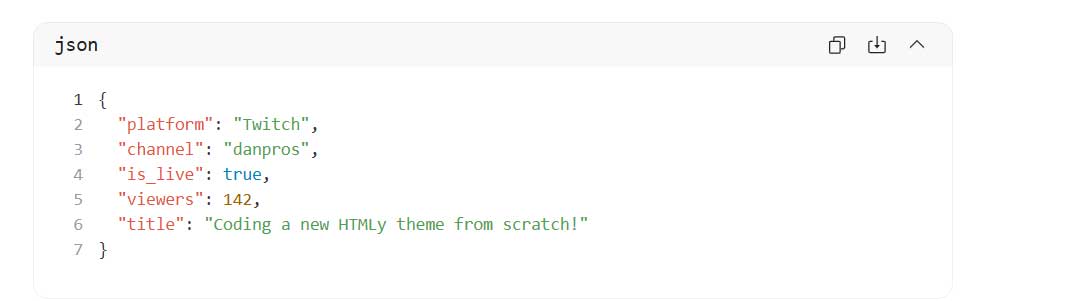
We can now call our function and render a slick modern widget. Here's the full implementation including some basic CSS to make it look good in dark mode.
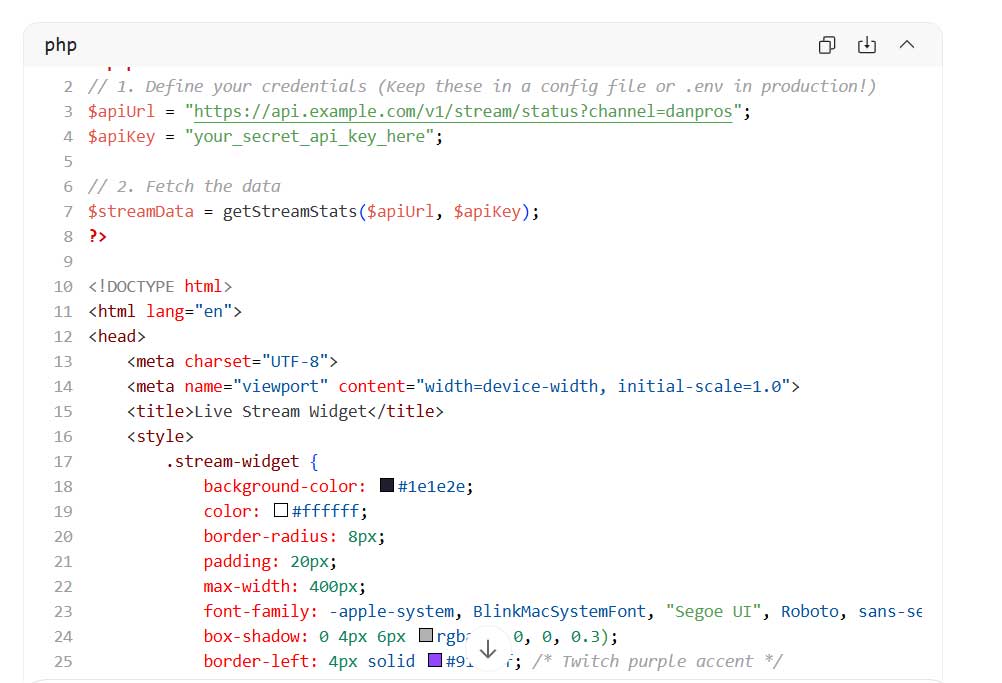
Note: Always use htmlspecialchars() when outputting API data to prevent Cross-Site Scripting (XSS) vulnerabilities.
Bonus: Integrating with HTMLy
If you are using HTMLy, the open-source, databaseless PHP blogging platform, integrating this widget is incredibly straightforward. Because HTMLy relies on flat files, you don’t need to worry about database queries slowing down your page.
- Create a new file in your active theme directory, for example: themes/your-theme/stream-widget.php.
- Paste the PHP logic and HTML/CSS from Step 3 into this file.
- In your main template (e.g., header.html or sidebar.html), simply call the file using HTMLy’s built-in function:

This keeps your code modular, clean, and easy to update without touching the core template files.
Best Practices for Production
Before deploying this to a live website, keep these three critical best practices in mind:
Implement Caching: Do not call the API on every single page load. Most streaming APIs have rate limits, and unnecessary requests will slow down your site. Implement a simple file-based cache that stores the JSON response for 60 to 120 seconds. This is especially important for databaseless platforms like HTMLy.
Secure Your API Keys: Never hardcode your API key directly into a public template file. Store it in a server-side configuration file (like .env or config.php) that is excluded from version control and not publicly accessible via the web.
Legal Compliance and Terms of Service: When integrating third-party APIs to display live data, developers must prioritize compliance with data privacy regulations and the provider's terms of service. As noted by legal professionals:
"When integrating third-party APIs to display live data, developers must prioritize compliance with data privacy regulations and the provider's terms of service. Proper data handling, user consent, and clear attribution aren't just technical best practices—they are essential legal safeguards that protect your digital assets from liability."
—The Team from Hammers Law Firm
Conclusion
Displaying live stream statistics on your PHP website is a highly effective way to boost engagement and provide real-time value to your visitors. By leveraging a reliable third-party API and a lightweight cURL implementation, you can build a fast, secure, and visually appealing widget in under 50 lines of code.
Whether you are enhancing a personal blog or building a complex reseller dashboard, this modular approach keeps your site fast, maintainable, and aligned with modern web development standards.